One-Tap Incident Reporting
Document incidents immediately with photo evidence and structured severity classification.
From GPS attendance and route optimization to a built-in bilingual training academy, versioned policy management, and provincial compliance reports — ElderCare Companion covers every operational workflow your agency runs daily.
Ready to see it live? Book a 15-min demo →
What happens at the client’s door.
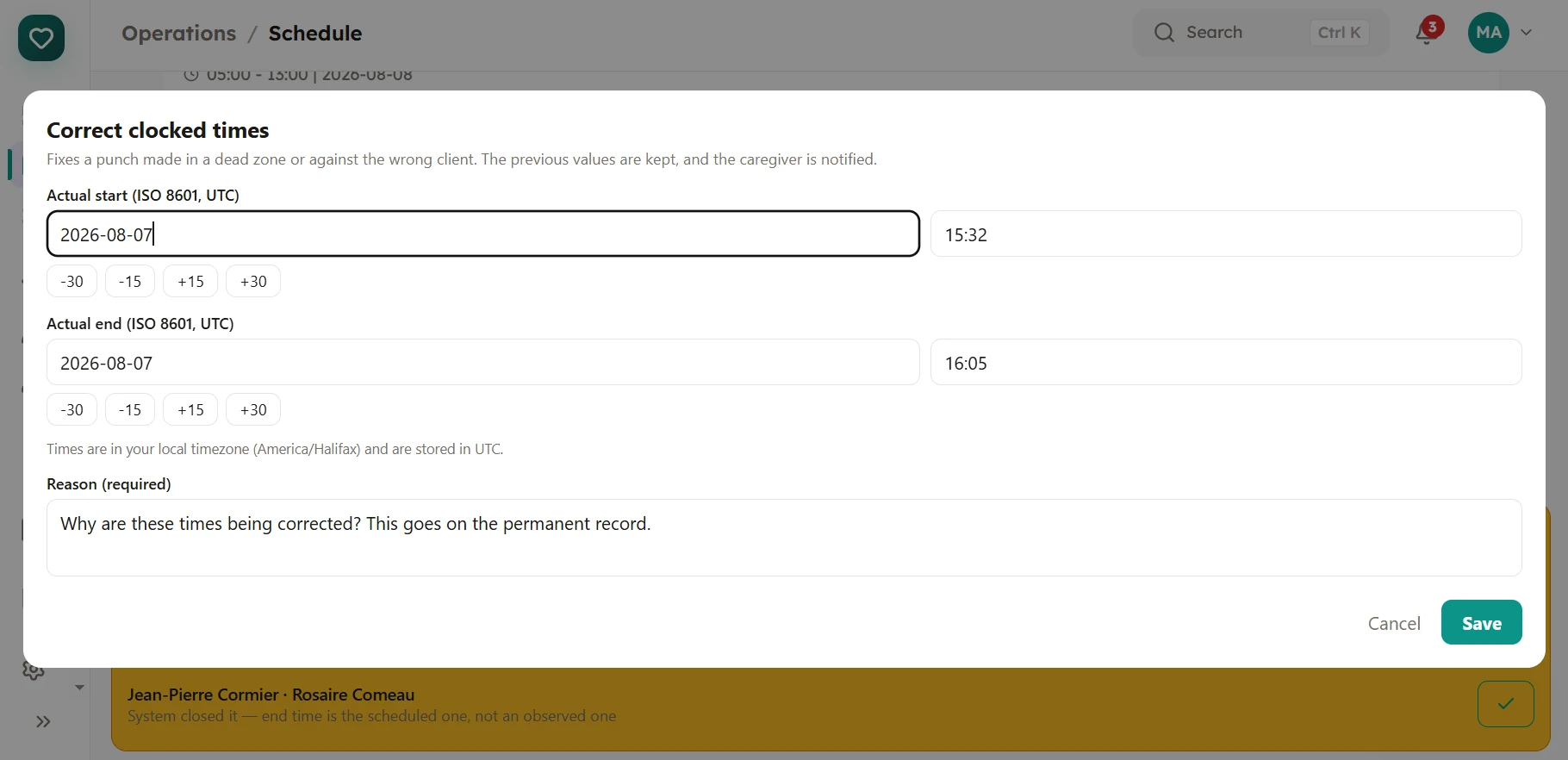
A caregiver clocks in at the client’s door, and the app checks they are there before it accepts the punch. Times are the server’s, not the phone’s, and a punch cannot be overwritten once made. You set how close is close enough — 100 m suits a town street, and a rural property with a long driveway needs more.
Where it stops. Location proves a device was near an address; it cannot prove a person did the work. A determined caregiver can spoof GPS on Android, and iOS gives us no way to detect it at all. We flag what we can see rather than claim what we cannot, and the exception queue below is how the remainder gets caught.
Most visits are unremarkable. The ones that are not — a device reporting a mock location, a visit that ended early, a caregiver who forgot to clock out and went home, a scheduled visit that never reported anything at all — land in one short list for a supervisor, instead of being buried in a note nobody reads. Each one is either corrected or answered, and then it leaves the list.
Why it matters more than the geofence. No location check catches everything. What an auditor or a funder actually asks is not “was this impossible to fake?” but “who looked at this, and what did they conclude?” That question has an answer here.
Full MAR compliance, built in. Only authorized nurses and admins can log administration, while PSWs and allied health see the client’s record without the medication list. Access follows the permission you grant the role, and every agency can change it.
Rural Atlantic Canada has real dead zones. Care carries on when the connection does not — notes, tasks and medication records are captured on the device, held in an encrypted queue, and replayed automatically the moment signal returns. Nothing is retyped, and nothing is lost in a basement in Miramichi. On the rare occasion something cannot be sent at all, it is not discarded quietly — it waits under Settings, named, for somebody to retry it. Clock-in and clock-out work offline too: the time is captured when the caregiver taps, not when the signal returns, and the visit is marked as reported-from-the-device so a supervisor can see it before it is billed.
Schedule the day’s care tasks and verify they happened where they were meant to — location is captured at check-off, not just a tick. Tasks are classified clinical or non-clinical, and the server refuses a restricted task from an unqualified role, so scope of practice is enforced rather than trusted.
Document incidents immediately with photo evidence and structured severity classification.
From missed medications to patient falls — every alert reaches the right person instantly.
Document care moments with photo evidence — from wound progress to daily activities. Photos are encrypted, org-isolated, and shareable with families at the tap of a button.
Log vitals, mood and meals, then see where a client is heading — blood pressure, SpO₂, temperature and glucose charted over time with rising, falling or stable badges against normal ranges.
Individualised plans with goals that are actually tracked: progress, status, milestones and due dates, rather than a free-text box nobody revisits.
Paying your staff, and invoicing whoever pays you.
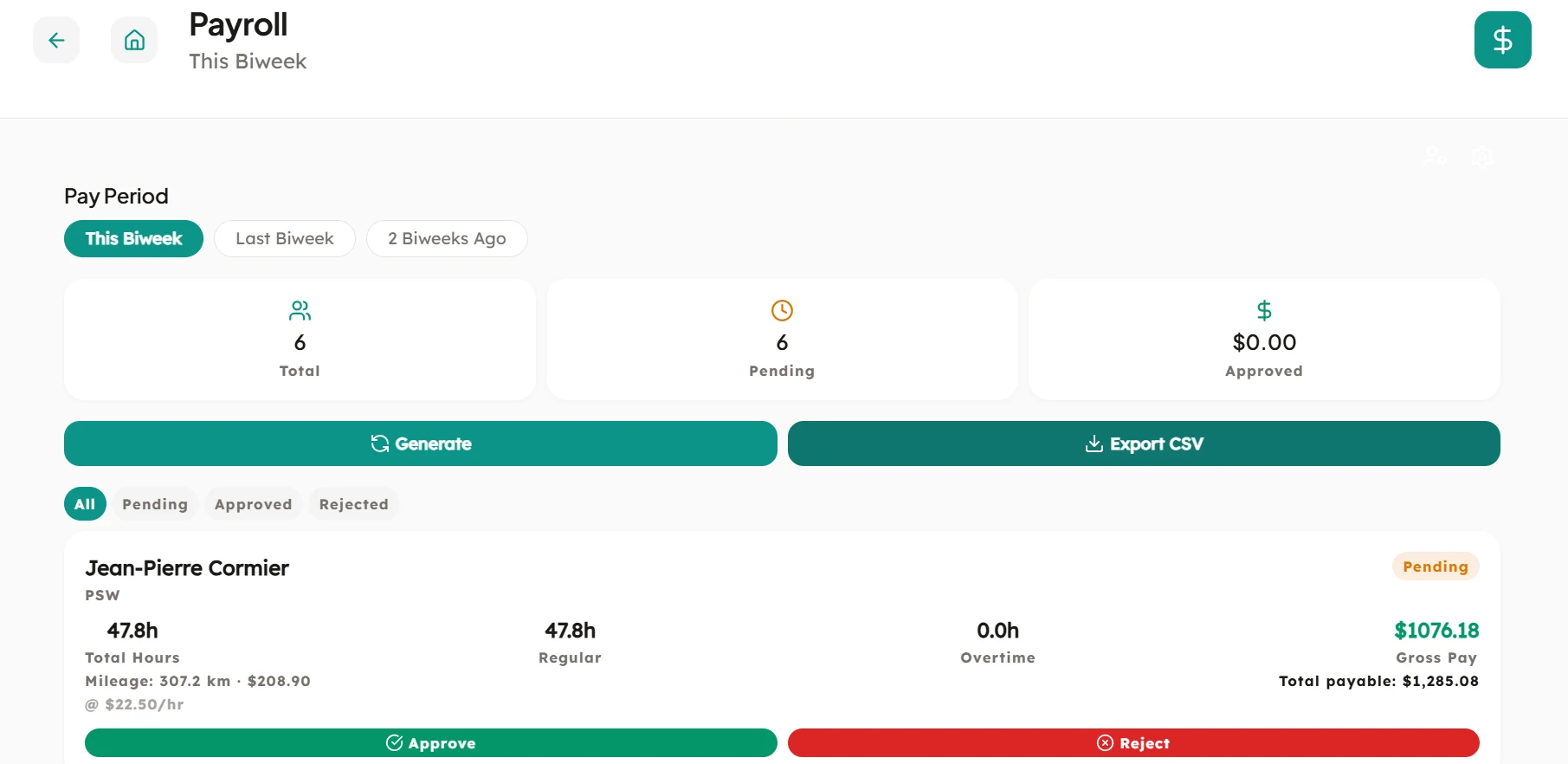
Generate accurate timesheets directly from GPS-verified shift data. Per-role pay rates, individual overrides, and Atlantic Canada overtime rules (44 h/wk NB default) are built in. Mileage is reimbursed at your own per-kilometre rate and kept separate from wages, so your payroll processor taxes the earnings and not the expense — and if you pay for the time spent driving between clients as well, that is counted as work and goes through overtime like any other hour. Export to CSV for ADP, Payworks, or QuickBooks.
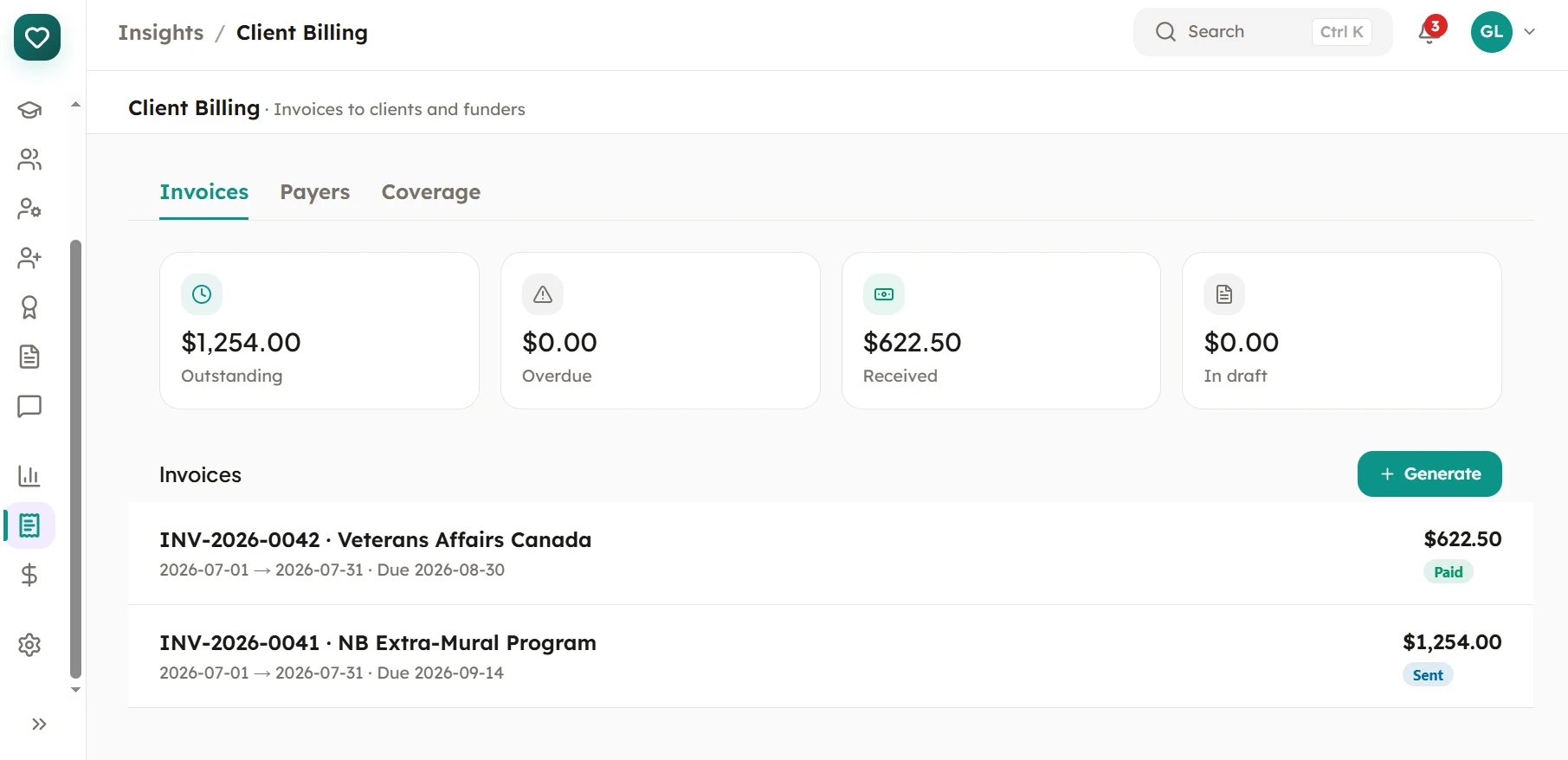
Invoice the people who actually pay you. Record who funds each client and in what share — a provincial programme covering 70% and a family paying the rest is entered exactly that way — then generate a draft invoice per payer, itemised by visit date and hours. Invoices are built from visits that were genuinely delivered, never from the schedule. Issuing one emails it to the payer as a PDF, so the invoice leaves the system the moment you send it.
Getting the right caregiver to the right door.
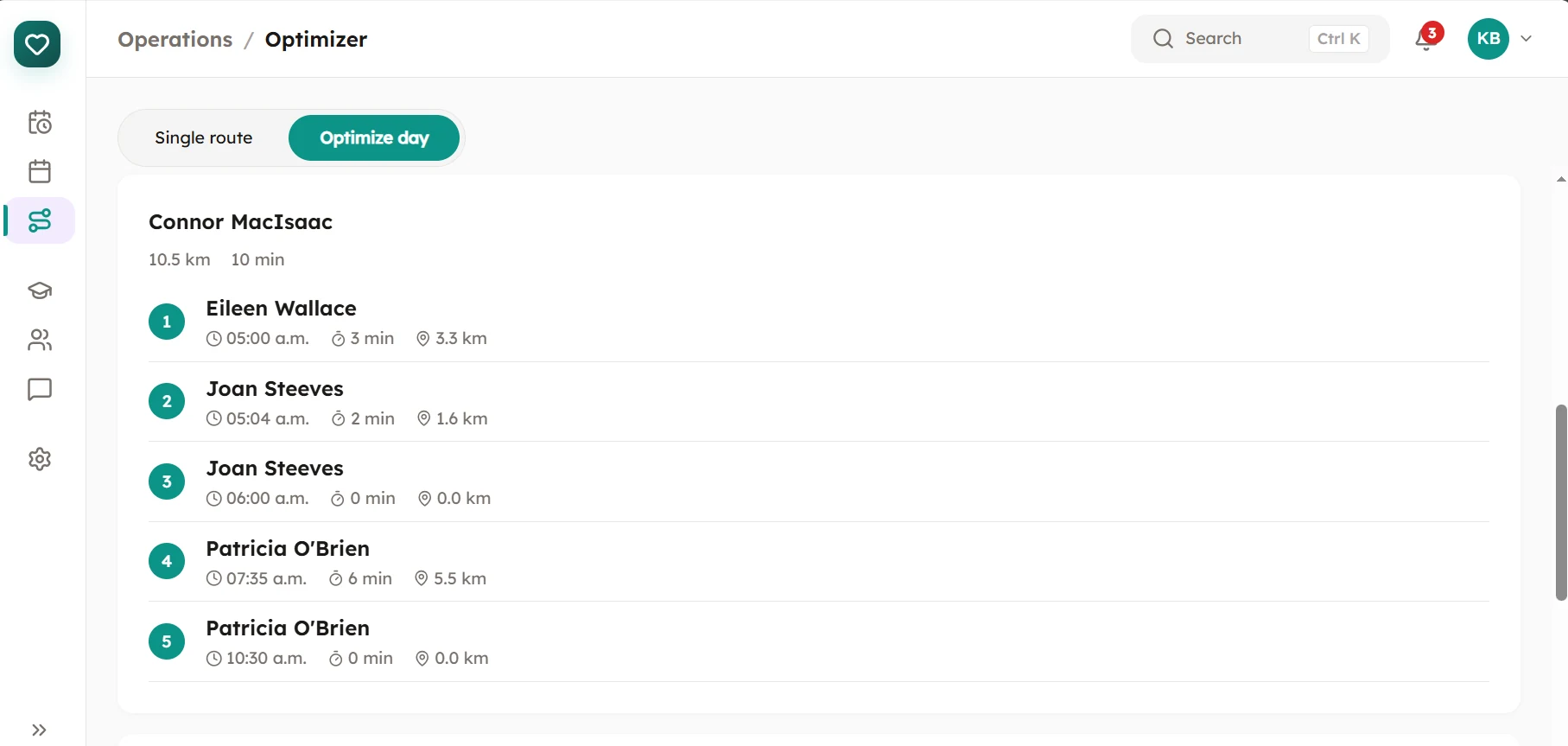
Rural Atlantic Canada means long drives between visits. Our optimizer sequences each caregiver's day to cut backtracking — and can re-allocate visits across your whole team to minimize total drive time. Real geocoding and real distance math, not straight-line guesses.
Stop paying for a separate LMS. Assign mandatory compliance training, deliver it right inside ElderCare, and let every completion flow back as a tracked, expiring credential. Caregivers tap "Training" and land straight in their courses — no second login. Bilingual (EN/FR) end-to-end and hosted in Canada, like the rest of the platform.
Advertise where caregivers already look — Indeed, Job Bank, your own page — and enter the people who answer into a pipeline rather than an inbox. Each applicant moves through six stages — applied, screening, interview, offer, hired, or rejected — with interview notes kept against the person rather than in somebody’s head. When you hire, the onboarding invitation goes out in the same action, and the account is created the moment they accept it. Waiting for them on day one is the list of credentials their role is required to hold in your province, already itemised as what is still outstanding.
Where it stops. A hire that fails part-way — most often because the email already belongs to a user — is rolled back whole: the applicant stays at the stage they were on and no half-made account is left behind. What we do not do is background checks or reference calls; those stay with you, and the notes field is where the outcome goes.
The first day is the one that decides whether software gets used. Setup is a guided sequence — organisation, sites, staff, clients — that remembers where you stopped and lets you resume, rather than a blank dashboard and good luck. Staff and clients come in from a spreadsheet: download the template, upload your file, and see exactly what would be created and what would be rejected before anything is written.
See your entire operation at a glance. Active shifts, overdue tasks, medication alerts, and incident flags — all surfaced proactively so you find out before a family does.
Track certifications, manage availability, and handle shift swaps — all in one place. Get automatic alerts before certifications expire so you're never caught off guard during an audit, and a readiness view that answers “who is short of what” before an inspector asks.
Manage multiple locations from a single dashboard. Track occupancy and per-facility activity from one dashboard, with staff and reporting scoped to the site they belong to.
Real-time care-team chat scoped to a client, plus private one-to-one staff conversations with read receipts and unread badges. Falls back gracefully when the connection is poor.
Ready before the inspector calls.
Generate complete provincial audit packages in minutes, not days. Every care note, medication log, incident report, and GPS record is automatically compiled into an export-ready compliance package. When an inspector calls, you're ready.
A shared drive can hold your policies. What it cannot tell you is who has read them. Here every document is versioned, and every acknowledgment is against a specific version — so publishing a revision re-opens the question for the people it affects rather than letting an old signature stand for new text. Admins see a ledger of who has signed and who has not, and can nudge the stragglers without composing an email.
The inspector export. One action builds a zip in the shape an
inspector asks for: a folder holding the current version of every active document, an
acknowledgments.csv with one row per signature ordered oldest first so it
can be read chronologically, and a manifest recording when it was generated, by which
organisation, and how many of each it contains. Run it against your active library for
a visit, or widen it to the full history for an annual review.
Where it stops. The diff is line-level on text PDFs. A scanned or photographed policy has no text to compare, so instead of inventing one we say plainly that the document was replaced and ask staff to re-read it in full.
Seven reports are waiting on the day you start, each answering a question an administrator actually asks: how heavily is each caregiver used, which credentials expire soon, which visits were completed, what incidents occurred, whose care plan is due for review, how long hiring takes, and where overtime is building up. Beyond those, you can save your own — choose the data, the columns and the filters, and keep it for next month rather than rebuilding it.
Where it stops. The seven built-in reports are fixed on purpose: they are the ones an inspector or funder recognises, so they cannot be edited into something that shares their name but not their meaning. Copy one into a report of your own and change that instead. Columns carrying sensitive detail stay restricted when the report runs, whoever it was shared with.
Every agency is different. Admins can grant or revoke individual permissions per role — without touching code.
Protect every account with TOTP-based two-factor authentication.
Planned for organizations managing large teams across multiple provinces. These features are on our roadmap and will be available in an upcoming release.
A client or their representative can ask for everything you hold on them. Privileged users export the complete record in one action, so a request is answered in minutes rather than assembled by hand.
Keeping families informed, in both official languages.
Give families secure, read-only access to care notes, medication logs and daily updates, so they can see how the day went without ringing your office to ask.
Bilingual at the database layer, not as a translation overlay. Every screen, every transactional email, every push notification, and every compliance PDF renders in the user's preferred locale. The Atlantic credential catalog ships with bilingual labels; locale preference is per-user and follows them across devices. New Brunswick is the only province where the Official Languages Act makes EN / FR parity a legal exposure — meet it with the same effort as a monolingual deployment. (User-facing messaging is localized in the app; low-level REST API validation strings are returned in English and surfaced through the localized UI.)
preferred_locale persists server-side; toggle from SettingsEach user sees exactly what they need — nothing more, nothing less. Job roles reflect real care team titles; admin and super_admin are privileges that can be assigned to any role.
Full visibility into every aspect of your agency operations.
Simple, fast tools that get out of the way of care.
Full financial visibility without clinical clutter.
Clinical tools built for allied health professionals.
Staff operations without clinical noise.
Peace of mind through transparency.
Book a 15-minute demo and we'll walk through every feature for your specific agency.
Book a Demo →